
Arbiter
ArbiterSportsSports
4.3495.00 Reviews
- Version
- 1.20.0
- Installs
- 100.00K
- Age Rating
- Everyone
Screenshots
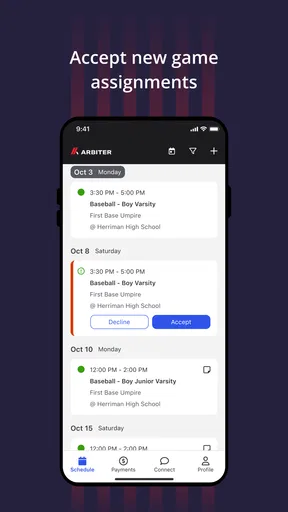
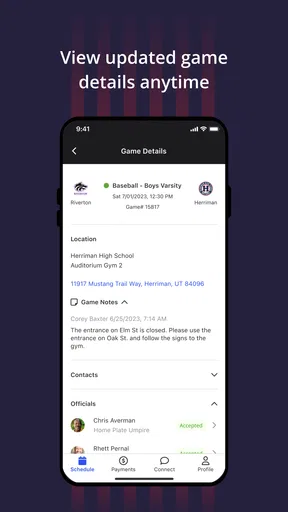
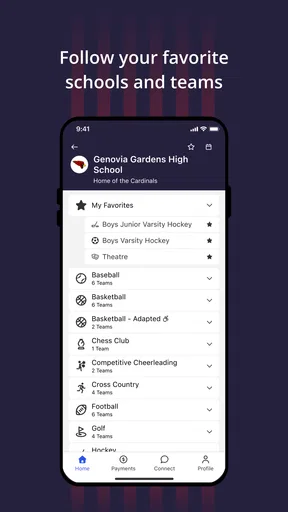
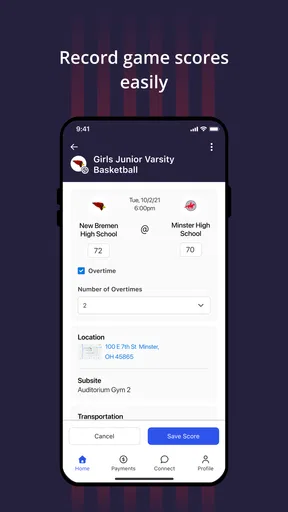
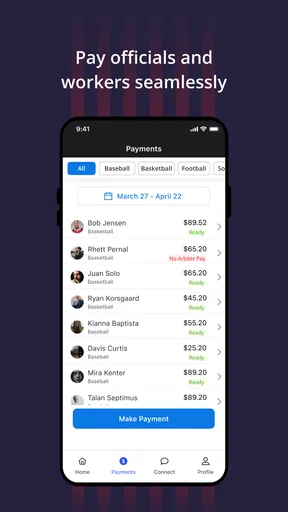
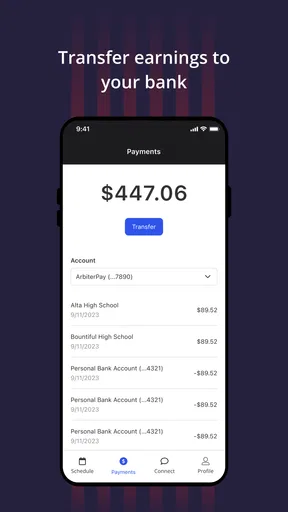
Our Review of Arbiter
 Analysis by Appyee
When I first looked at Arbiter, I approached it less like a typical sports app and more like a practical tool for people who keep games moving behind the scenes. Its focus is not training plans, live scores, or sports news. It comes from ArbiterSports, and its place in the sports category is tied to the organization and administration around play. That distinction matters because the right question is not “Is this the most entertaining sports app?” but “Does it fit the way I already manage my sporting commitments?”
My overall impression is that this is a focused, free app for users who are already connected to an organized sports environment. It is available to everyone by age rating, runs on Android 7.0 and later, and the current version is 1.15.0. The audience is likely to get the most value when the app is part of a wider ArbiterSports workflow rather than something opened casually by someone who simply wants sports content.
What I would check before choosing it
The first decision criterion is your role. If you are an official, coordinator, administrator, or someone who regularly handles assignments around games, Arbiter deserves a closer look. If you are a fan looking for fixtures, scores, commentary, or athlete statistics, I would not start here. The app’s value depends on whether you need operational information connected to participation, not whether you want a general-purpose sports feed.
The second criterion is whether your organization already uses ArbiterSports. A sports administration app can be useful on its own, but these tools become much more convenient when the leagues, assignments, or events you care about are already organized in the same ecosystem. In practical terms, I would ask the league office or assigning organization whether this is the app they expect people to use before spending time setting it up.
I also consider how often I need access while away from a desk. A web browser can be perfectly adequate for occasional administration, especially when I am preparing a season or reviewing a large amount of information. A mobile app earns its place when I need to check something quickly between games, while traveling, or when a last-minute change requires attention without opening a laptop.
There is also a difference between a tool for personal convenience and a tool that supports a group process. Arbiter is more compelling when several people rely on the same organized information. That shared context can reduce the need to search through messages or maintain separate notes, but it also means the experience is influenced by how consistently the organization uses its system.
Finally, I would judge it by reliability and clarity rather than visual excitement. Sports apps are often compared by how much content they display. Here, a better test is whether I can understand what needs my attention and act without confusion. For a referee or coordinator, a quiet, functional interface can be more valuable than a colorful stream of updates.
How I would use it in a normal week
Imagine a weekend with several matches. Before leaving home, I would use the app as a mobile checkpoint for the commitments connected to my role. Instead of treating it as something to browse continuously, I would open it at specific moments: when planning the weekend, before traveling, and after any message from the organization that might affect the schedule.
That workflow is more realistic than expecting the app to replace every communication channel. If a coordinator still sends urgent information by phone or email, I would continue checking those channels. The useful habit is to use Arbiter as the place for organized sports information and use direct communication for anything that requires an immediate personal response.
One practical tip is to check the app before leaving for a venue rather than only after arrival. That gives me time to notice a changed commitment or an item that needs clarification. Another is to avoid relying on memory after a busy day. If the app is the official source for my assignments, I would verify details there and keep my personal calendar aligned, while remembering that a personal calendar may not reflect later changes automatically.
A third insight is that mobile convenience does not remove the need for a clear routine. The app can make access easier, but it cannot decide which information is authoritative when an organization uses several systems at once. I would establish one simple rule: use the organization’s designated Arbiter information as the operational reference, then contact the coordinator when something appears inconsistent.
Where the focused approach works well
The strongest part of Arbiter is its narrow purpose. Rather than trying to be a complete sports media product, it is positioned around the administrative side of participation. That can make it a better fit for people whose main problem is staying organized around games, officials, and responsibilities.
I also like the fact that the app is free. For an individual official or volunteer, avoiding another subscription can make adoption easier. For an organization, free access may lower the barrier for people who only need occasional mobile access. Still, “free” should not be confused with “effortless.” The real investment is learning the organization’s process and keeping information consistent.
The app has reached more than one hundred thousand installs, with an average rating of 4.1 from roughly seven hundred seventy ratings and four hundred forty-four written reviews. I read that as a sign of a functioning, established tool rather than a brand-new experiment, while also remembering that ratings reflect different sports, organizations, devices, and expectations. A solid average is encouraging, but it is not a guarantee that every league’s workflow will feel equally smooth.
Another advantage is its broad device accessibility. Supporting Android 7.0 and later means people using older Android phones are not automatically excluded. That matters in volunteer-heavy environments, where not everyone upgrades devices frequently. I would still pay attention to how the app behaves on my particular phone, because an operating-system requirement only tells me whether installation is possible, not whether every screen feels equally comfortable.
Its Everyone content rating is also appropriate for a tool connected to organized sport. Parents, volunteers, officials, and administrators can consider it without the age-related concerns associated with entertainment apps. That does not make it a children’s sports product, though; the usefulness still depends on having a relevant role in an organized program.
Small workflow choices that make a difference
For a busy official, I would avoid opening the app only when something has gone wrong. A better approach is to make a short review part of the day’s preparation. Check the relevant information, confirm that it matches what you expect, and then move on. This reduces the chance of discovering an issue while already standing at the venue.
For a coordinator, I would be careful about assuming that every participant understands the same process. If I were introducing the app to a group, I would explain what it is meant to replace and what it is not meant to replace. That one clarification can prevent people from treating it as a news app or expecting it to contain every conversation about a game.
For someone who works across multiple leagues, the main benefit may be consolidation, but that is also where attention is needed. I would check names, dates, and assignments carefully when moving between contexts. A mobile interface encourages quick taps, and quick taps are useful until the wrong event or organization is selected.
I would also keep notifications and personal routines separate in my mind. If the app alerts me to something, that is helpful, but I would not assume an alert alone is a complete record of my obligations. The safest workflow is to open the relevant information and confirm the details, particularly before travel.
Where another type of app may be better
Arbiter is not the obvious choice for every sports-related need. If my priority were watching scores, reading news, following a team, or comparing player performance, I would choose a consumer sports app built for that purpose. Those products usually make discovery and entertainment the center of the experience, while Arbiter is better understood as an organizational companion.
A general calendar may also be preferable for someone with only a few commitments and no need to interact with a sports administration system. A calendar is familiar, flexible, and useful across work and personal life. Its weakness is that it depends on manual entry or separate synchronization. If my league already maintains official information through ArbiterSports, using only a calendar could leave me responsible for copying changes and correcting mistakes.
Email and messaging apps can be better for discussion. They are natural places to ask a coordinator a question, explain a conflict, or share a special instruction. Their weakness is that important details can become buried in conversation. I see Arbiter as more useful for structured information, while messages remain better for exceptions and human clarification.
A browser-based administration portal may suit a person who manages large amounts of information from a desk. Bigger screens are often more comfortable for reviewing several items at once, and a browser can fit naturally into an office workflow. The mobile app makes more sense when I am away from that desk and need the same sports-related context in a compact form.
There is also a trade-off between specialization and independence. A generic app lets me design my own system, but I must build and maintain it. A specialized app can save that effort when my organization has already chosen the platform, but it may feel limited if I want to customize everything. I would choose Arbiter when alignment with the organization matters more than personal flexibility.
Who should think twice before installing
I would skip it if I only want a casual sports experience. Someone searching for exercise guidance, live match entertainment, or a social community may install it and wonder why it does not solve the problem they actually have. The app’s narrow role is a strength for the right user and a limitation for everyone else.
I would also hesitate if my league does not use ArbiterSports in a meaningful way. Installing an administrative app without a connected organization can create more confusion than value. Before committing, I would confirm that my relevant games, assignments, or responsibilities are handled through the platform.
People who dislike checking structured information may prefer a simpler personal routine, but that simplicity can be deceptive. Writing a game time in a notebook is easy; keeping it accurate after changes is harder. Arbiter is worth considering when the cost of missed updates is greater than the small effort of learning the app.
Finally, I would not choose it as my only communication method for urgent issues. Even when an app is central to an organization’s workflow, a direct message or phone call may be more appropriate when a decision is time-sensitive. The best setup is not app versus communication; it is knowing which channel serves which purpose.
The real cost of changing your routine
Because the app is free, the main switching cost is not money. It is attention. I would need to install it, sign in or connect it to the relevant organization, learn where important information appears, and adjust the habit of checking other sources. That is manageable, but it is still a transition.
The first few uses are where mistakes are most likely. I would not wait until the day of an important game to learn the interface. Instead, I would open it during a calm period, inspect the information connected to my role, and make sure I understand how I am expected to use it. If anything looks incomplete, I would ask the coordinator before assuming the app is at fault.
There is also a social switching cost. If only part of a group adopts the system, people may continue duplicating information through texts, email, and paper notes. That can reduce the benefit of having one organized place. The app works best when the organization clearly defines its role and users know which updates belong there.
My advice is to run a short parallel routine at first. Keep the familiar calendar or notes for a limited transition period, compare them with the information in Arbiter, and remove duplication once confidence grows. That is safer than abandoning every old habit immediately, especially when travel or assignments are involved.
What the current release means for a new user
The current version is 1.15.0, and the app was released on July 19, 2021. I would treat that history as useful context rather than a reason by itself to install or avoid it. A product with time in the market may have had an opportunity to mature, but the important question remains whether its present workflow matches my organization.
ArbiterSports is the developer, which gives the app a clear connection to the service it represents. That is reassuring when I want the mobile experience to reflect the same ecosystem used by the sports organization. At the same time, I would judge the app by my actual tasks rather than by the developer name alone.
Before recommending it to a friend, I would ask four practical questions: Does your league use ArbiterSports? Do you need mobile access to organized sports responsibilities? Are you comfortable keeping the app alongside direct communication? And are you willing to spend a little time learning the workflow before relying on it? A “yes” to most of these points is a much better predictor of satisfaction than a general interest in sports.
My recommendation for different users
For officials and volunteers who need a mobile connection to organized sporting duties, I would recommend giving Arbiter a fair trial. Its free price removes a common obstacle, its age rating makes it broadly accessible, and its focused purpose can be more useful than a generic calendar when the organization already works within ArbiterSports.
For administrators, I would recommend it as a companion rather than a total replacement for every desktop and communication tool. The mobile format is valuable for quick checks and field use, while larger-screen workflows and direct conversations still have their place.
For fans, casual players, and people looking for sports entertainment, I would recommend choosing a different category of app. Arbiter is unlikely to satisfy those goals because its usefulness comes from organized participation, not from delivering a broad stream of sports content.
My final view is positive but deliberately specific: Arbiter is worth installing when your sports organization already depends on the ArbiterSports workflow. I would not download it simply because it belongs to the sports category. I would download it because it can turn a scattered set of game-related responsibilities into something easier to check while I am away from my desk. That is a practical benefit, and for the right user, it is enough to make this free app a sensible part of the weekly routine.
Privacy and Permissions
See what permissions an app requests and how it handles your data.
- Calendar
- read calendar events plus confidential information, add or modify calendar events and send email to guests without owners' knowledge
- Location
- approximate location (network-based), precise location (GPS and network-based)
- Photos/Media/Files
- read the contents of your USB storage, modify or delete the contents of your USB storage
- Storage
- read the contents of your USB storage, modify or delete the contents of your USB storage
- Camera
- take pictures and videos
- Microphone
- record audio
- Other
- view network connections, full network access, run at startup, draw over other apps, control vibration, prevent device from sleeping
Verdict
Strengths of Arbiter
- Clear interface makes core features easy to find.
- Useful tools help organize tasks and information efficiently.
- Responsive performance on most modern mobile devices.
- Convenient access to important content while on the go.
- Regular updates can improve stability and add helpful features.
Limitations of Arbiter
- Some advanced features may require payment or a subscription.
- The initial setup can take time for first-time users.
- Notifications may feel excessive until they are customized.
- Certain functions may depend on a stable internet connection.
- Compatibility and performance can vary across older devices.
Similar Picks in This Category
View All
BeSoccer: Soccer Live Score
BeSoccer apps4.3

Cricbuzz - Live Cricket Scores
Cricbuzz.com3.7

NFL
NFL Enterprises LLC2.4

Da Fit
MO YOUNG LIMITED3.6

ESPN
Disney4.5

LiveScore: Live Sports Scores
LiveScore Limited4.5
Frequently Asked Questions
What is Arbiter and what can I use it for?
Arbiter is an app designed to help users manage and evaluate decisions, discussions, or competing options in a more organized way. Depending on the version and platform, it may provide tools for comparing choices, recording outcomes, or reaching a fair conclusion. Before downloading, review the app’s official description to confirm which features are included and whether it matches your specific needs.
Is Arbiter free to download and use?
Arbiter may be available as a free download, but some features can require in-app purchases, a subscription, or an upgraded account. The exact pricing and limitations may differ between Android and iOS. Check the store listing before installing, paying particular attention to trial periods, recurring billing, advertisements, and which tools are available without payment.
Does Arbiter require an account or an internet connection?
The requirements can depend on how you plan to use Arbiter. Basic functions may work without registering, while saving information, synchronizing data, collaborating with other users, or accessing personalized features may require an account. Some tools might also need an active internet connection, so check the permissions and store information if offline access is important to you.
Is my information safe when using Arbiter?
Before using Arbiter for personal discussions, decisions, or sensitive information, review its privacy policy and the permissions requested during installation. Check whether data is stored locally or uploaded to the developer’s servers, and whether information may be shared with analytics or advertising providers. Avoid entering confidential details unless the app’s privacy practices are clear and acceptable.
Which devices are compatible with Arbiter?
Arbiter’s compatibility depends on the operating system, device model, and minimum software version supported by the developer. Check the official Google Play or App Store listing before downloading to verify requirements, available languages, and whether the app is offered in your region. Keeping your device updated can also help prevent crashes and compatibility problems.
